Amber Animator App Icon

Let’s Make a Movie.

When classic stop-motion apps disappeared and others added costly subscriptions, I sat down with my kids and students to build the studio we wished existed. 100% ad-free, completely private, and crafted so young animators can bring clay, LEGO®, and drawings to life in minutes.

Animation 101 What is Stop-Motion?

An animation technique where real physical objects (like clay figures, Lego bricks, or toys) are moved in tiny increments between individually photographed frames.

1 Move Position toy 🖐️
2 Snap Take photo 📸
3 Play Magic motion! 🎬
When played back at 6 to 24 frames per second, your physical creations magically come to life on screen!

One-time purchase. No subscriptions. Zero ads. 100% offline & private.

Creating in the classroom? Explore Amber Animator for schools
Amber Animator iPad Stop-Motion Camera Studio with Onion Skinning

Built by educator Sethi De Clercq (Flipped Classroom Tutorials) for genuine classroom learning. Read our story →

Behind the App

Built at the Kitchen Table. Made for Real Classrooms.

When classic animation tools vanished and apps filled with subscription traps, a teacher and father built the studio he wished existed.

Hi, I’m Sethi! As an educator bringing stop-motion into the classroom and a dad of young kids, I saw firsthand how transformative tactile animation can be.

A few months ago, sitting at our kitchen table surrounded by Lego bricks, clay figures, and cardboard backdrops, my kids went to open our go-to animation app—only to find it had been quietly discontinued and pulled from the App Store.

When I searched for alternatives for my classroom students and family, every app on the store was either bloated with $9.99/month subscriptions, plagued with third-party tracking, or so complicated that young kids spent all lesson fighting the interface instead of animating.

"I wanted an app that is simple enough for an 8-year-old to direct their first film in five minutes, yet powerful enough with multi-frame onion skinning and multi-track cartoon audio to create something truly magical."

So I built Amber Animator. Designed at the kitchen table with my own children as chief testers, and refined with real classroom feedback, it is 100% ad-free, completely private (everything stays securely on your iPad), and designed to spark genuine creative confidence.

Classroom-Tested Simplicity

No confusing submenus or technical jargon. Younger students jump straight in and make their first animated scene within minutes.

100% Offline & Private

Zero third-party trackers, zero data harvesting, and no account logins required. Works 100% offline in airplane mode.

Honest, Family-Friendly Pricing

No recurring monthly fees. One single unlock with Apple Family Sharing covers up to 5 family devices across your household.

Real Creative Power

Multi-frame ghost onion skinning, hands-free timer capture, a 13-sound physical cartoon Foley board, and pristine 4K export.
Professional Stop-Motion Studio

Everything Young Animators Need to Direct Masterpieces

Engineered with high-performance Apple native Swift & Metal technology, providing smooth timeline scrubbing, multi-layer audio, and instant 4K exporting.

Precision Control

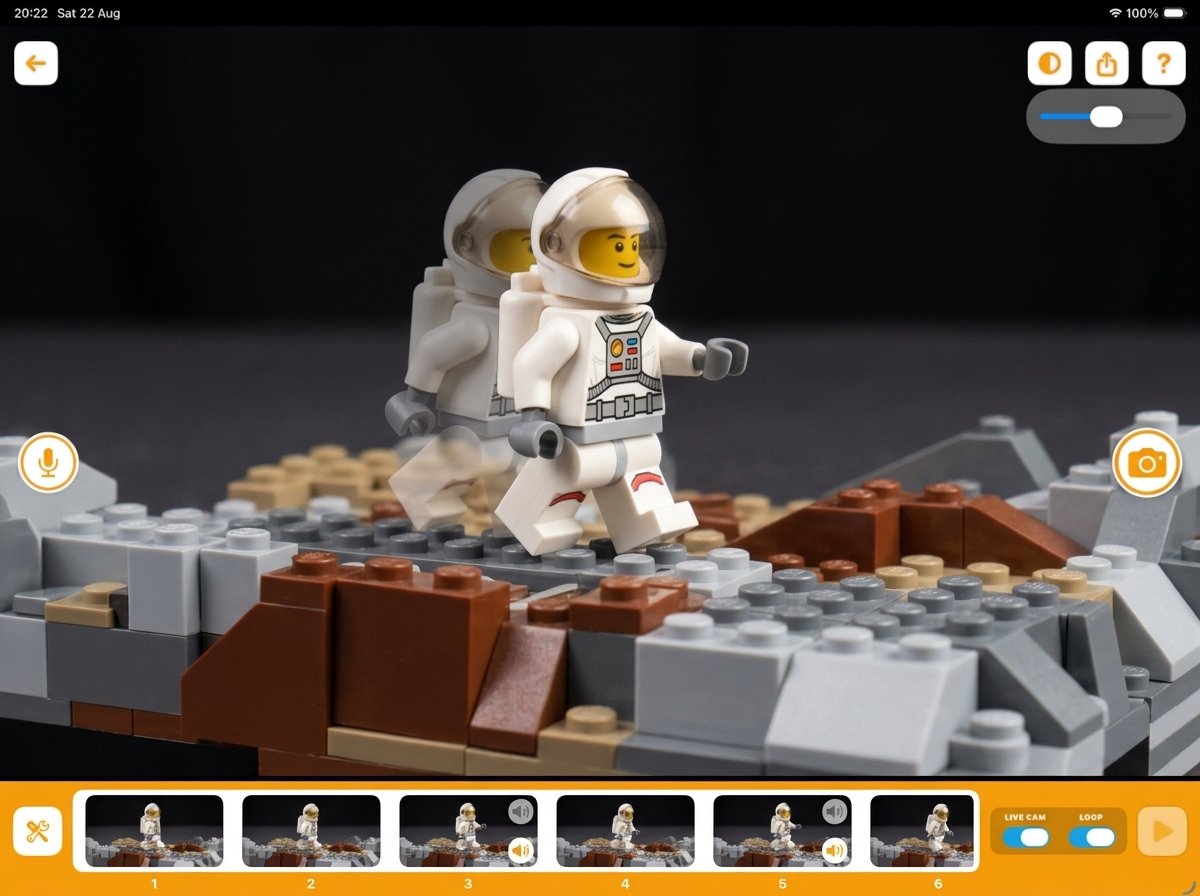
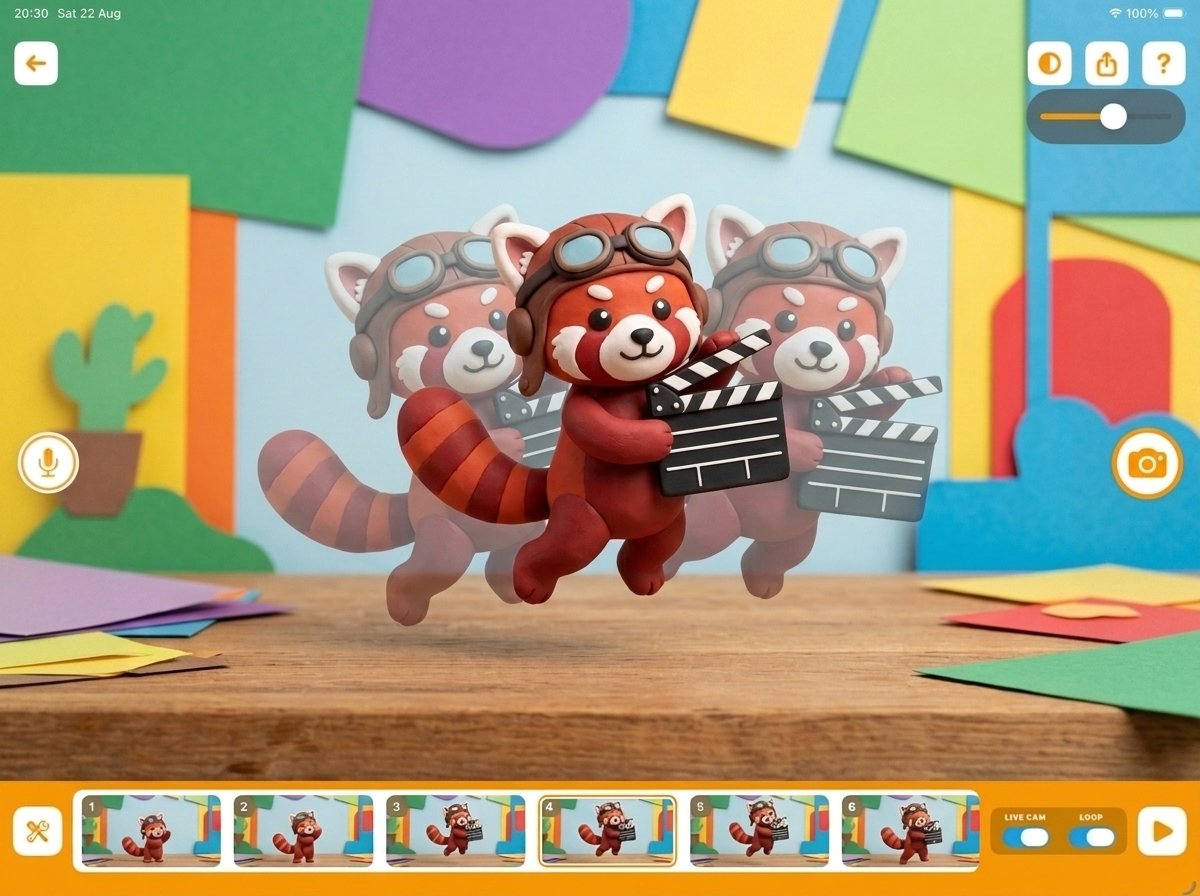
Multi-Frame Onion Skinning

See a transparent ghost overlay of up to 3 previous frames with adjustable opacity. Line up character postures and ball bounces with millimeter precision.

  • 1, 2, or 3 Previous Frame Overlays
  • Smooth Opacity Slider (10% to 100%)
  • Live Camera Matte Guides (16:9, 4:3, 1:1, 9:16)
Amber Animator Multi-Frame Onion Skinning with 3 ghost frames
Sound Studio

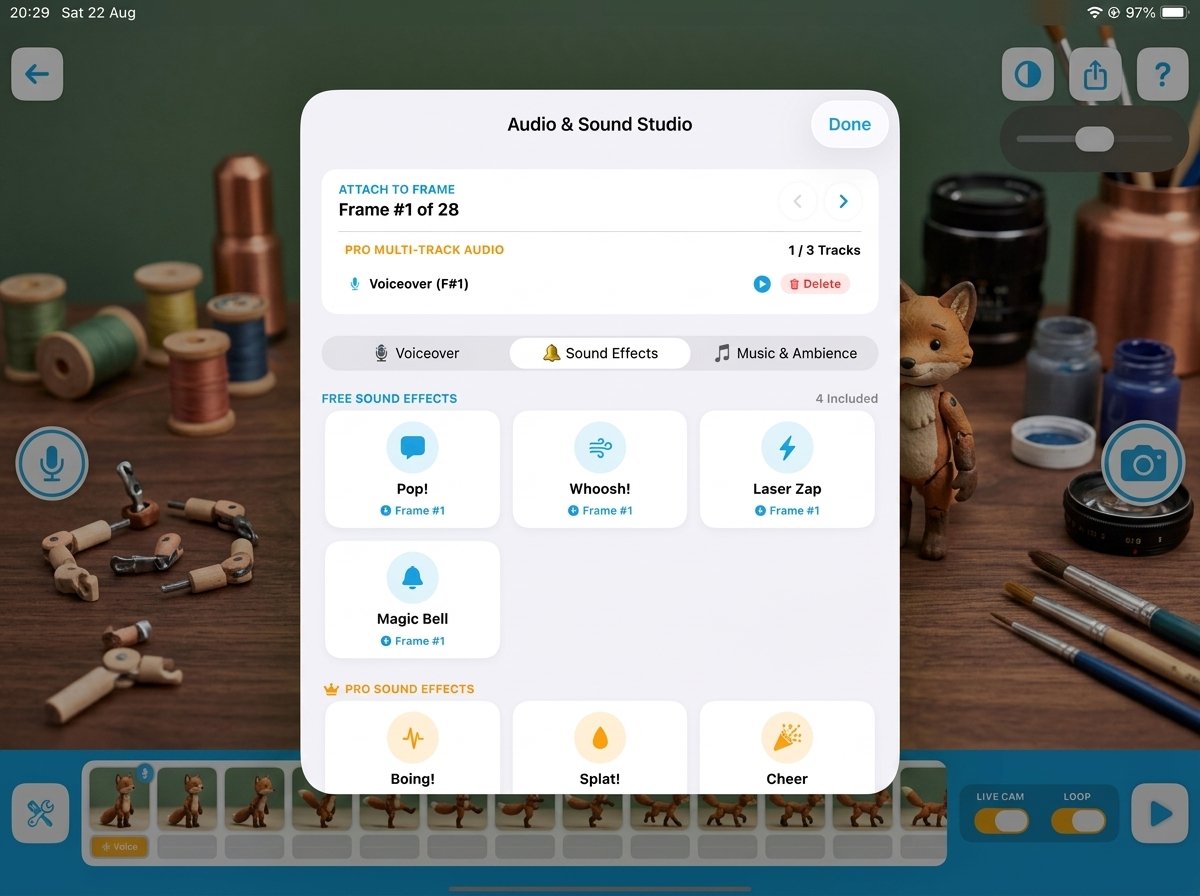
3-Track Multi-Layer Foley Audio

Layer voice acting, 13 built-in kid-friendly cartoon sound effects (Boing, Splat, Cheer, Rocket, Punch & more), and full background soundtracks simultaneously on any frame.

  • Crisp Voiceover Microphone Recorder
  • 13-Sound Physical Foley Soundboard
  • Custom Soundtrack Import with Fade In/Out
Amber Animator 3-Track Multi-Layer Foley Audio Studio

4K & 1080p Cinema Export

Export pristine MP4 movies with synchronized audio or looping animated GIFs without watermarks, ready to share via Messages, AirDrop, or school portals.

High-Capacity Memory Engine

Smart on-demand disk caching and memory optimization designed for long movies, hundreds of frames, and fluid playback.

Hands-Free Auto-Capture

Continuous interval timer loop (every 3s, 5s, 10s, 15s, 30s) allows solo animators to position characters with both hands.

Customizable Framerates

Switch between 6 FPS (great for younger beginners), 12 FPS (classic stop-motion), and 24 FPS (fluid cinematic motion).

Exposure & Focus Lock

Lock exposure, white balance, and focus with one tap to keep lighting consistent and eliminate stop-motion room flicker.

Live Aspect Ratio Guides

Compose stories with 16:9 Cinema, 4:3 Classic, 1:1 Square, and 9:16 Social Reels framing matte masks on your viewfinder.

Made with Love for Families

The Screen-Time You Can Feel Great About

Instead of passive scrolling and algorithm feeds, Amber Animator turns screen-time into real-world creative craftsmanship with clay, toys, drawings, and storytelling.

One-Time Purchase — No Subscriptions

No recurring monthly fees. Unlock all professional features once with lifetime access and Apple Family Sharing for the whole household.

100% Kid-Safe & Private

Operates completely offline. All pictures, voice recordings, and movie files stay safely inside your device's private sandbox.

16 Collectible Movie Awards

Kids earn colorful rosette badges and celebratory fanfares as they master voiceovers, multi-frame timing, and direct their first films!

Math-Gated Grown-Ups Zone

Parental Gate challenge prevents accidental in-app purchases or leaving the app, keeping young children securely in their creative workspace.

Lifelong Creative Growth

Beyond the Screen: How Stop-Motion Nurtures Young Minds

Stop-motion is one of the rare digital activities that bridges physical craftsmanship with spatial logic, storytelling, and creative resilience.

Physics & Spatial Logic

Intuitive Spatial Reasoning

Kids explore gravity, acceleration, and trajectory through hands-on trial and error.

Example: Moving a clay ball 2mm vs 10mm between frames visually demonstrates velocity, gravity curves, and easing.
Literacy & Empathy

Storytelling & Dialogue

Translating abstract thoughts into structured narratives, character motivation, and expressive voice acting.

Example: Children script character motivations, direct plot twists, and record expressive emotional voiceovers.
Tactile Dexterity

Fine Motor Skills & Craft

Physical clay modeling, Lego assembly, and prop design away from passive taps and algorithm feeds.

Example: Sculpting tiny character limbs and balancing props on set develops patience, hand-eye coordination, and spatial care.
Focus & Resilience

Patience & Problem Solving

Building sustained attention and learning that creative masterpieces are built one intentional micro-step at a time.

Example: A 15-second movie requires 90 deliberate steps—giving kids genuine pride in their finished creation.
Built for Classrooms & STEAM Labs

Empower Hands-On Storytelling in the Classroom

Amber Animator is the ideal creative teaching tool for art, science demonstrations, literacy, and history dioramas. It is built to operate reliably on school-managed iPads.

Classroom Project Duplication Teachers can create starter storyboard templates and duplicate them for student teams with 1 tap.
Apple School Manager (VPP) Available with volume purchase education discounts for school districts and educational institutions.
COPPA & GDPR-K Compliant No student accounts, no sign-ins, and zero data leaves the iPad. Works seamlessly behind school firewalls.
Keila Student Animator
Gamified Filmmaking

The Movie Awards Trophy Cabinet

Motivate kids to explore every aspect of filmmaking with 16 collectible rosette badges across Production, Audio, Camera Mastery, and Exporting.

First Spark Start 1st Project
Voice Actor Record Voiceover
Foley Artist Add Sound Effects
Phantom Master Use Onion Skin
Movie Premiere Export 1st Movie
Grand Director Shoot 100+ Frames
The Amber Ecosystem

Explore the Amber Creative Universe

Amber Animator is part of an inspiring educational network created by educator Sethi De Clercq to foster creativity, coding, and craftsmanship for kids and teachers worldwide.

Got Questions?

Frequently Asked Questions

No! Amber Animator is available as a single one-time Pro upgrade with lifetime access. It also includes Apple Family Sharing, so everyone in your household gets full access without extra charges.

No. Amber Animator works 100% offline. Kids can animate in the car, on planes, in backyards, or inside school classrooms with restricted internet access.

Amber Animator features a true 3-track multi-layer audio engine. On any frame, you can record a voiceover, trigger a cartoon sound effect from the built-in soundboard (Boing, Splat, Cheer, etc.), and import a background music file from your device with customizable starting frame and fade in/out.

Yes! Amber Animator is configured for Apple School Manager and the Volume Purchase Program (VPP), allowing schools to deploy licenses in bulk with educational discounts.

Amber Animator supports all iPads and iPhones running iOS 16.0 or later, fully optimized for Apple Silicon and iPad displays.

Amber Animator Icon

Start Your Animation Studio Today

Turn toys, clay, and drawings into thrilling cinematic stop-motion movies.